Delete a Place
Remove a place that's no longer in use — an office that closed, a meeting room that was repurposed, a stockroom that was consolidated.
danger
Deletion is irreversible. Devices that were assigned to the place don't disappear, but they lose their location and need to be reassigned manually.
Steps
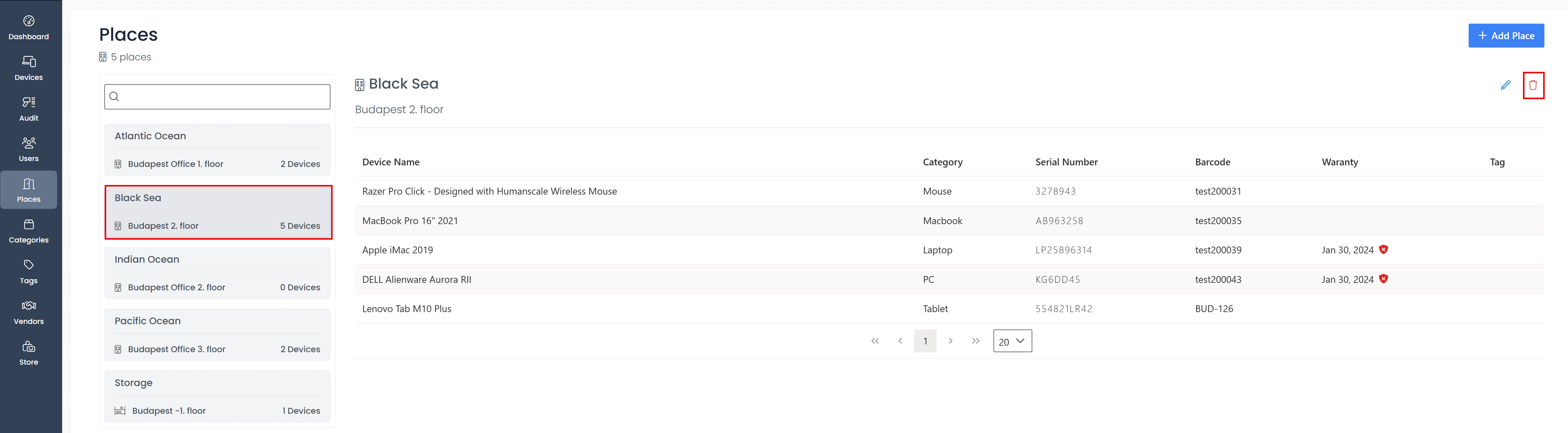
- Click Places in the sidebar.
- Select the place tile you want to delete.
- Click the bin icon in the top-right corner of the detail pane.
- Click Yes in the confirmation dialog.
What happens to devices at this place?
- Their Assigned To field is cleared — they're treated as unassigned IT stock until you reassign them.
- The device record, status, history, comments, warranty, and invoice data are untouched.
- A Place removed event is appended to each affected device's history.
Tip before you delete
Open the place first and check the device list on the right. If it's a long list, plan the new home for each device before deleting — otherwise you'll have a queue of unassigned devices to clean up afterwards.